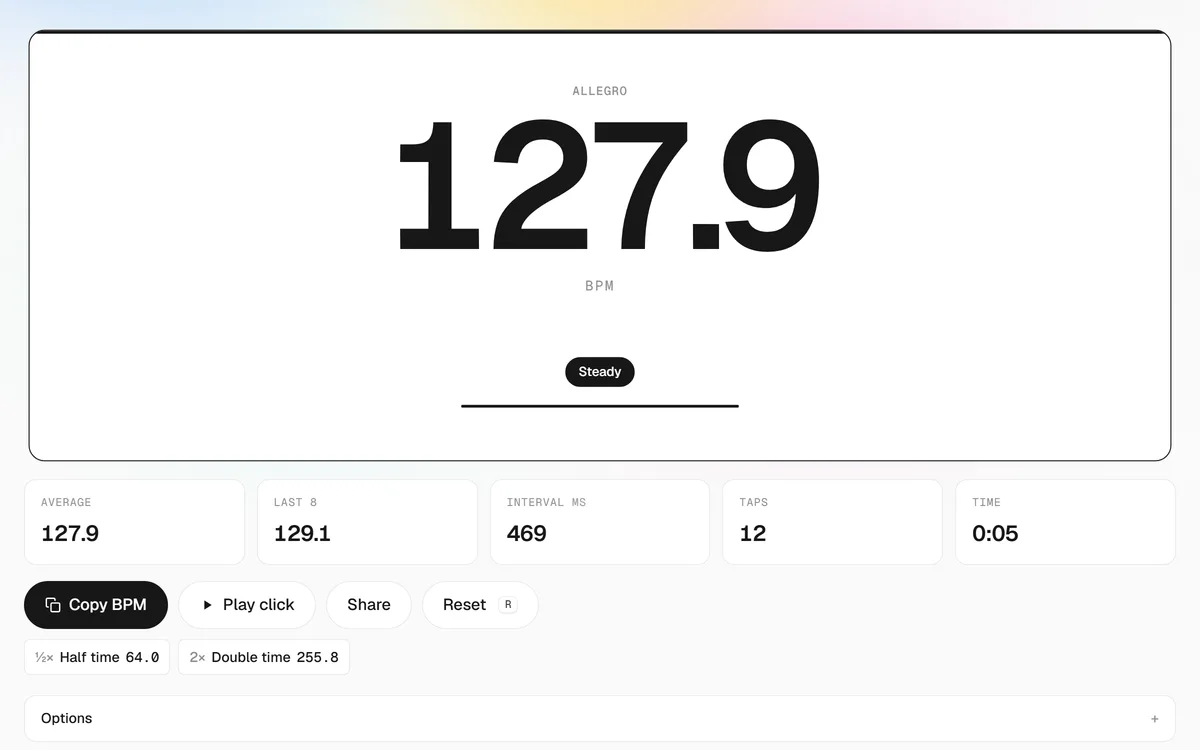
How to use this tap tempo tool
- Play the music. A track, a rehearsal, a metronome you are trying to match, a video — anything with a beat. Nothing is uploaded; the tool only measures your taps.
- Tap on every beat. Press any key, click, or tap the pad in time with the pulse. The BPM appears on the second tap and updates on every tap after that.
- Watch it settle. Four taps give a usable number; after eight the reading is marked Steady. If it flickers, you are probably tapping a subdivision — check the half-time and double-time values.
- Take the tempo with you. Copy the BPM into your DAW, drum machine or delay pedal, play it back as a click to confirm it against the song, or share the link. Pause for two seconds and the counter clears for the next tune.
What is tap tempo?
Tap tempo is the fastest way to put a number on a beat. Instead of analysing an audio file, you tap along with the music and a BPM counter measures the time between your taps. Sixty seconds divided by the average gap is the tempo in beats per minute. Tap every 500 milliseconds and you are at 120 BPM; every 400 milliseconds and you are at 150.
The same phrase shows up on hardware and in software. A tap tempo footswitch on a delay, tremolo or looper pedal lets a guitarist set the effect time by stomping a few beats, so repeats land on the song’s pulse even when the drummer speeds up. In Logic Pro, Pro Tools, Ableton Live, GarageBand, Cubase and FL Studio, a tap tempo command sets the project tempo from a few taps of a key. This page is the browser version of that idea: a tempo tapper you can open on any phone or laptop, with no download and no account.
How this BPM counter calculates tempo
Every tap is time-stamped with the browser’s high-resolution clock, which is precise to a fraction of a millisecond. The tool then works with the intervals between taps rather than with a single running average from the first tap:
- Outlier-tolerant average. One early or late tap would normally drag the result. Once there are four intervals, any gap that is far shorter or longer than the median is ignored, so a single slip does not cost you the reading.
- Last-8 rolling tempo. Alongside the whole-session average you get the tempo of your most recent eight taps. If a live band drifts, this number follows it while the average stays put.
- Steadiness check. The spread of your recent intervals is measured on every tap. When it falls under about 4–5 percent, the reading is labelled Steady; if your taps are all over the place it tells you so instead of showing a confident-looking wrong number.
- Half and double time. A pulse can be felt at several levels. Both alternatives are always visible, and the I’m tapping option lets you tap once per bar in 4/4, 3/4 or 6/8 and still read the beat tempo.
- Click-back verification. The one thing tap statistics cannot tell you is whether the number matches the song. Press Play click and a metronome runs at the detected tempo over the music — a wrong reading drifts out of time within a couple of bars.
Who uses a tempo tapper
Musicians in rehearsal tap the tempo the band actually plays a song at and write it on the chart. Producers tap for BPM to set a project tempo from a reference track before importing anything, then read the delay times in milliseconds shown under the pad. DJs get the BPM of a record, a radio stream or a video that will never exist as a file on their drive. Drummers and click-track operators check a song’s tempo between sets; music teachers show students what 60, 90 and 120 BPM feel like; dancers and fitness instructors build playlists at a target pace; rhythm-game mappers confirm a track’s BPM before charting it. It also counts anything else with a regular pulse — a pendulum, a dripping tap, or your own heartbeat if you tap along with it.
Tempo markings at a glance
Once you have a BPM, the tool labels it with the classical Italian tempo term. The ranges below are the common modern convention; the full tempo markings chart has the complete list with examples.
| Marking | BPM range | Feel |
|---|---|---|
| Grave | 24–40 | very slow, solemn |
| Largo | 40–60 | broad, slow |
| Larghetto | 60–66 | rather broad |
| Adagio | 66–76 | slow and stately |
| Andante | 76–108 | walking pace |
| Moderato | 108–120 | moderate |
| Allegro | 120–156 | fast, bright |
| Vivace | 156–176 | lively |
| Presto | 176–200 | very fast |
Tap tempo vs. BPM finder vs. metronome
Use tap tempo when the music is playing in the room and you want a number now — it works on live sound, streams and videos because it never needs the file. Use an automatic BPM finder when you have the audio file and want the tempo detected from the waveform, typically together with the key. Use a metronome when you already know the tempo and need a steady click to practise or record to. All three meet on this site: tap here, then open the online metronome with tap tempo to practise at that speed, the BPM calculator to convert it into delay times, Hz and bar lengths, or the guide on how to find the BPM of a song for the other methods.